
· We recommend obtaining or creating a layout of your intended system identifying all proposed installation locations, also noting building construction materials to assist in determining optimal Gateway installation locations
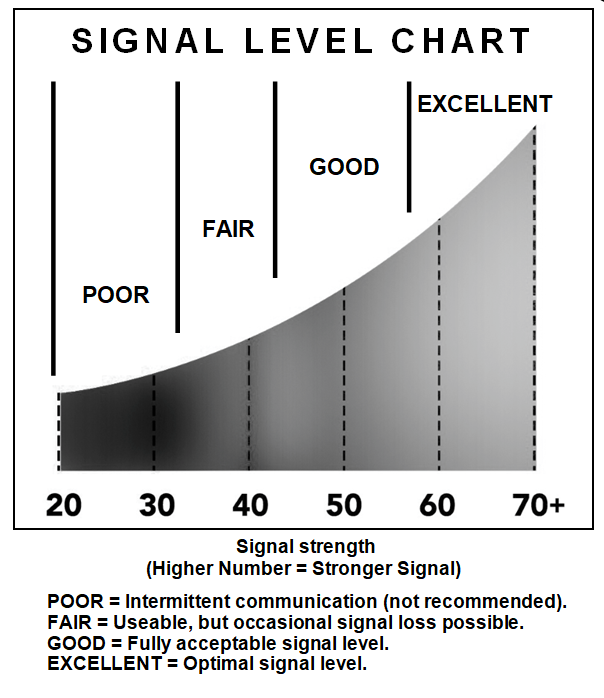
Under Configuration > Wireless Configuration, the Transmit Signal, Receive Signal and RSSI Indicates the signal strength for Locks, NetPanels and Expanders. For the best results, aim for a signal strength in the Good range (Fully Acceptable Range). Signal Strength between 32 and 42 are considered Fair, while values above 42 are considered Good. If necessary, relocating the gateway or adding optional expanders may help improve signal strength.
Gateway Location Guidelines
Before selecting a final mounting location for your Gateway, the following must be taken into consideration:
Gateways should be positioned within a 175-foot radial distance from the intended wireless lock locations.
Gateways must be mounted vertically. Horizontal or "flat" ceiling mounting should be avoided.
The preferred mounting height is 6 to 12 inches below a standard 8-9 foot ceiling.
Open areas will improve signal range, while concrete building materials, walls, ceilings, and narrow corridors can reduce range.
ArchiTech series locks generally have a shorter range to/from a Gateway.
The Gateway should typically be within 75 feet (radially) of an AL-IME2-EXP Expander.
Choose a location that allows access to an RJ-45 Ethernet cable connection.
Gateways should be installed in elevated positions to optimize signal strength. Avoid placing them in drop ceilings, as this can negatively impact performance.
While wood and wallboard have minimal effect on signal strength, concrete or brick can reduce it by up to 35%. Steel-reinforced concrete or metal lath and plaster can cause signal strength to decrease by up to 90%.
Avoid mounting Gateways near electrical wiring or metal obstructions such as pipes or conduits.
Installing Gateways in computer closets or server rooms may negatively affect signal strength.
It is recommended to install at least one Gateway per floor in multi-floor buildings.
Expanders (Optional) Location Guidelines
Expanders increase the range of a Gateway. The Expander rear housing must be mounted "up"; i.e. when the front housing is attached, its engraved Networx logo must be located at the lower right with the front housing positioned "up" in a conventional manner. (The unit contains internal antennas that must be positioned vertically). Horizontal "flat" mounting of the enclosure is to be specifically avoided. As previously mentioned, the Expander only requires connection to the 12VDC power transformer wires.
Helpful Tips
· In difficult installations wherein signal problems exist, the use of (multiple) AL-IME2-EXP Expanders throughout the premises is recommended. AL-IME2-EXP Expanders extend the coverage area of Version 3 Gateways, allowing control of up to its rated maximum of 63 locks. Up to 7 Expanders can be added to one Gateway.
· We recommend obtaining or creating a layout of your intended system identifying all proposed installation locations, also noting building construction materials to assist in determining optimal Gateway installation locations